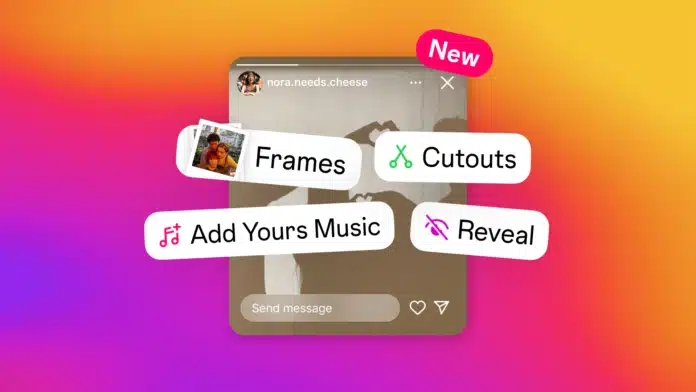
Are you sharing daily story updates on Instagram? Now, it has come up with another cool feature. If you want to know How to Use and Post Instagram Reveal Stickers Stories, the latest Instagram feature, you have come to the right place.
It allows you to post hidden photos on Instagram stories, which reveals when someone comments on your story.
Until then, your story will be blurred for your friends. Your friends can guess what you have posted on the story via the reply option after which they will be able to see your story.
also read: How to Delete a Your Facebook Page and Profile from Mobile, Desktop
Steps to Add Reveal Story on Instagram
- Launch the Instagram app and swipe left to go to the stories section.
- Select the photo that you want to hide in a revealing story.
- Tap the sticker icon from the top panel and select the Reveal option.
- You can add a message for your friends to make the reveal more intriguing.
- Click Done and post the story.
Features on Instagram Reveal Stickers
Reveal stickers on Instagram are a catchy way to interact with your friends. You can add interesting text and create suspense that will intrigue your friends to respond to the text box to know what they are going to see behind the curtain. This feature has the following features:
- Add a hint: If you use a Reveal sticker, it will allow you to add a hint about the post. Your friends can get an idea about the post from a hint and guess the response on reply.
- Makes your post mysterious: If you are using a Reveal sticker, it will blur the photo that you post and will create an urge in your friends to respond to it and know what you have posted. Mysterious, right?
- Reveals as soon as your friend replies to the story: You don’t need to approve the response of your users to make the story visible at their end. They only need to respond to the story, and as soon as they send the response, they will get access to your post.
Why Reveal Stickers?
If you are wondering about the utility of this new feature, worry not. We have it covered for you. These features make Instagram more user-friendly, adding just the right element to make your stories more engaging.
- Boost Engagement: Reveal stickers bound to your Instagram friends to DM you to know the content of the blurred image. It will help you initiate the conversation and make stronger connections with your friends.
- Builds anticipation: The hidden image increases the curiosity of your friends, and ultimately, they message you to know what’s hidden in your story. This feature is specifically useful when you are making announcements, promoting, or celebrating something.
- Apply filter amongst friends: This feature allows your post to be visible to only the users who DM you. Those who don’t initiate to message will not be able to see it. So, it will enhance privacy, as not everyone will be allowed to see your post, but only the friends who replied to your story.
Other Features Coming With The Upcoming Release
Additionally, Instagram is also bringing the Add Your Music sticker story, where you can add a story, and then your friends will get a prompt to respond with their favorite music.
- Another commendable feature includes a Frame Sticker that will turn your photo into polaroids, blur them, and they will reveal when someone shakes their mobile devices.
Wind Up
We hope now you know How to Use and post Instagram Reveal Stickers Stories. With these features, you will be able to engage better with your connections on Instagram.