Messaging apps like Facebook or Instagram have an option to follow them. At the same time, if you wish they allow the flexibility to unfollow users. If you wish to unfollow someone on Facebook, you can do that using simple steps.
When you unfollow someone on Facebook, you will no longer be able to see their stories and posts. However, Facebook will still send their birthday notification on your feed.
If they are still following you, they will be able to see your posts, stories, and profile. Additionally, Facebook doesn’t send notifications when you unfollow someone.
But due to any reason, if you wish to follow them again, they will receive your friend request.
also read: How to Create Your Facebook Polls (Best Ways)
Steps to Unfollow a Friend on Facebook via Mobile Device
You can use below three ways below to unfollow someone from Facebook using the mobile application.
Unfollow People from Facebook Settings
- Launch the Facebook app and tap the hamburger icon at the top right corner to find the menu.
- Expand the Settings & Privacy tab and go to Settings.
- You will find the New Feed option below Preference.
- Tap Unfollow to find a list of people you follow on the app.
- Search for the user you wish to remove as your follower and tap the Unfollow button.
If you wish to follow the user again, you can tap the Reconnect option below the Unfollow one. You will find a list of users you unfollowed from your profile in the past. Tap follow to add them to your account again.
Unfollow Users from Facebook via Their Profile
- Launch the Facebook application, and in the search window, type the username you wish to unfollow.
- Tap to open its profile.
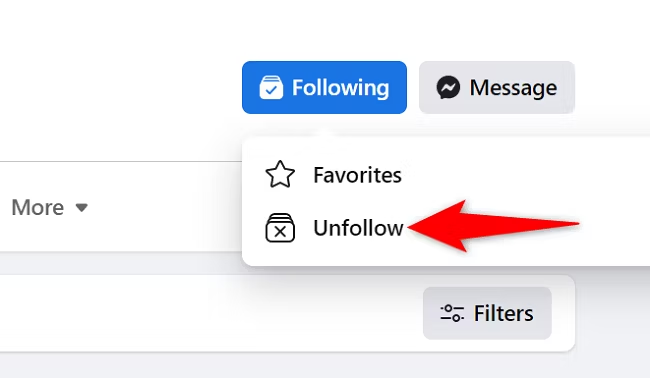
- Click the Friends button to open a pop-up menu.
- Select unfollow to remove the profile as your follower.
Unfollow People via a Facebook Post
- If you wish to unfollow someone via their post, tap the three-dot icon at the top right of it.
- In the menu, tap Unfollow.
How to Unfollow People on Facebook via Browser
You can use similar three ways to remove a follower when using Facebook via a web browser.
Unfollow users from Facebook Settings
- Login to your Facebook profile in either of the browser and tap the profile icon at the top right corner to open the menu.
- Go to Settings & Privacy and select Feed.
- It will open the Manage Your Feed section. Tap Unfollow people and groups to find a list of your Facebook friends and group.
- Search the user you wish to remove as a follower and tap Unfollow.
Unfollow Users via Their Profile
- Search the profile you wish to unfollow on your Facebook profile.
- Tap the Friends button to open the menu and click Unfollow.
Unfollow Users via Post
- On your Facebook profile, find the post whose owner you wish to unfollow.
- Tap the three-dot icon at the top right of the post.
- Select unfollow.
You can also tap the name of the post owner to navigate to its profile and unfollow the using the above steps.
If you don’t wish to unfollow your Facebook Friend but want to temporarily turn off notifications and updates from them, you can snooze their profile.
Wind Up
If some of your Facebook friends post something offensive or out-of-the-bound, you can unfollow them on the platform to take a break. It offers you an option to customise your chats per your preference.
If you don’t wish to see the content of one of your Facebook friends you can Unfollow them on Facebook using the above simple steps.
Additionally, if you don’t wish to unfollow someone on Facebook, an alternative is to snooze their profile or block them permanently.