
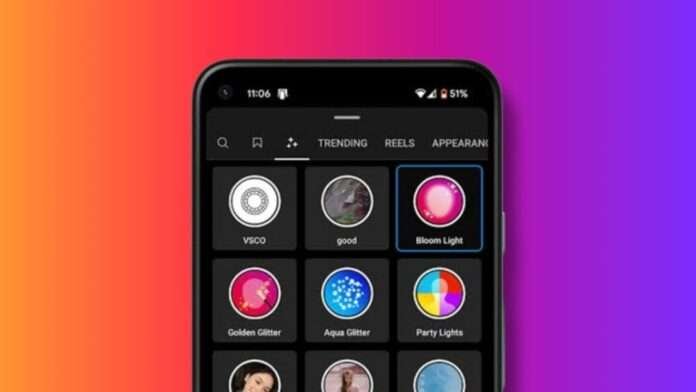
\\If you are an Instagram enthusiast and always looking for ways to make your stories and posts more interesting, you can explore a wide range of filters Instagram provides. Filters can make you pop up your Instagram stories and add an extra touch to them.
Not many people know how to use and search for effects on Instagram. If you already use this functionality, you can see the significant difference a filter can bring to your post.
Even if you haven’t used them till now, we recommend you start experimenting a bit.
All the influencers use the appropriate filters to make their posts and stories catchier and more appealing.
Here’s how you can find Instagram effects and use them to bring life to your dull stories.
also read: How to Change Email on Instagram Like a Pro: A Complete Guide!
How to Manually Search Instagram Filters?
Instagram provides a repository of a wide range of filters. You can either select the filters available on the bottom panel of a story or you can go to the repository and find a new filter.
Instagram provides you an option to apply the filter to a post and see its preview.
Some pictures look aesthetic in old school or black and white effect or others with more contrast or brightness. You can identify the correct filters and apply them to your reels or stories to make them appealing.
You can, thus, try and experiment with as many filters as you want. You can use the below steps to manually search for a filter on Instagram:
- Swipe right on your Instagram home page to add a story. You will see a camera viewfinder at the bottom panel.
- You will many default filters available at the bottom panel. Scroll to the right to find a magnifying glass icon for the Browse effect option towards the end.
- Tap the search icon at the top of the pop-up window.
- You can now add a name, style, or theme of an effect.
- Tap the filter you like and see the preview of the filter in the viewfinder.
How to Browse Effects Across Categories on Instagram
When you go to the Filter Library of Instagram, you will find different tabs with headers, such as Aesthetic or Games.
These are the categories in which Instagram sorts its filters. If you are not sure about the filter you are looking for, you can experiment with them by browsing different categories.
You can also experiment with different filters to see what suits best on your story.
If you want to find effects in the Instagram filter categories, you can use the below steps to do so.
- Launch the Instagram app and slide right to the open stories window. Add and finalize the story. You can add a picture, text, video, and background of your choice to it.
- Now, in the viewfinder, scroll to the right to find the Browse Category Magnifying Glass icon.
- In the filters pop-up, you will find different categories, namely, Appearance, aesthetic, games, or humor.
- You can now scroll through them to find the filter of your liking. Switch tabs to get category-specific options.
- You can tap the filter you like to preview it in the viewfinder. Continue reviewing the different filters until you find the one.
Instagram allows you to preview as many filters as you want. Although, it only allows you to apply one effect per story.
How to Bookmark an Effect on Instagram?
Now, if you have managed to find a perfect Instagram effect for your stories and want to make it your default filter, you won’t need to remember its name and manually search it every time you wish to use it.
Instagram provides an option to bookmark the Effects that you wish to use in the future. You will need to navigate to the filter and tap the bookmark icon at the bottom right.
It will save this effect on your Viewfinder permanently. You can directly use it on your stories later from the bottom tab.
How to Search Reels from Effect on Instagram?
If you wonder how Instagram influencers create such an aesthetic reel, apart from their talent filters are the reason. Influencers generally use the correct filter to make their posts and stories more exciting and relevant for users.
Instagram not only provides an option to apply an effect on a post but allows you to search all the reels on which an influencer used this effect.
You can take ideas on how to use an effect by checking out the existing posts and reels. Here’s how you can see reels from an Effect:
- Right, swipe the home screen to find the viewfinder.
- Swipe right again to go to the browse effect button, and in the repository, go to the effect for which you wish to find a reel.
- Tap on the plus icon in the right corner.
- You will now see all the reels and accounts that used this filter. It’s the best way to take inspiration on how you can best use this filter to improve its aesthetics.
How to Search Effects and Apply it to a Reel on Instagram?
- From the bottom panel of your screen, Tap the + icon to add a post.
- Select the video you wish to add to your timeline and tap next.
- You will now find options to Edit it. In the bottom tab, tap the three-circle icon to search and apply an Instagram Effect.
- You can search, bookmark, or explore an Effect based on categories in the filter repository and apply it to your reel.
Wind Up
Trust me or not, Instagram Effects can add life to a dull post or story. If you want to liven up things and make your stories and posts visually appealing, we recommend you apply Effects to them.
It’s very easy to Search for Effects on Instagram provides using the above methods. You can also check how other people use the filter on their posts to get inspiration and make an aesthetic reel or post.